NovaBet CRM
Designing for a scalable iGaming backoffice platform. NovaBet CRM is a multi-functional internal platform built for iGaming operations teams, including finance operators, support agents, and risk analysts.
The product covers multiple operational areas such as player management, deposits, withdrawals, reporting, analytics, and risk-related workflows.
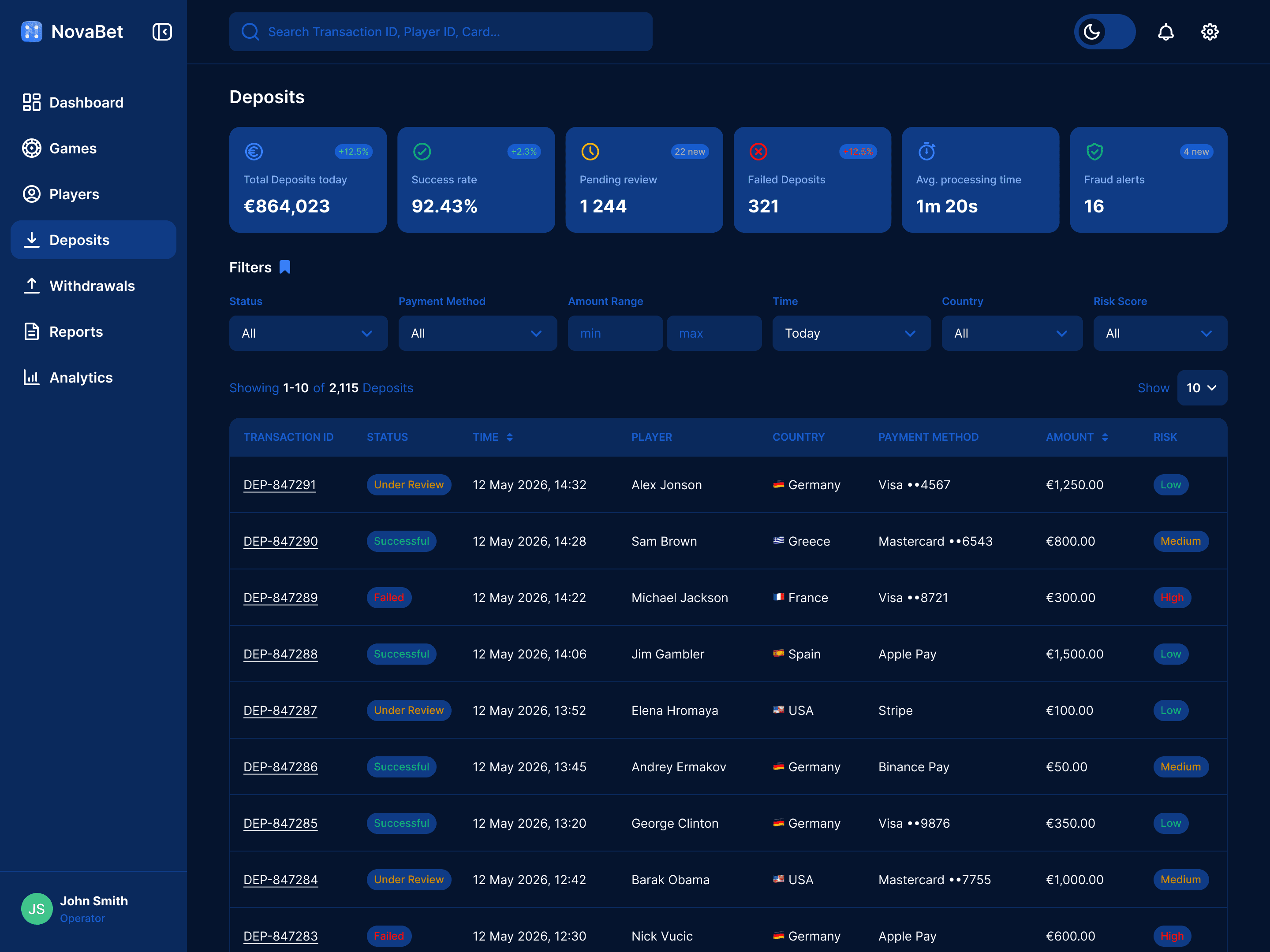
This case study focuses specifically on the Deposits section — a high-frequency operational area designed to help teams process player transactions efficiently, monitor payment activity, and manage manual reviews.


Deposits Overview
The Deposits section has been designed as an operational workspace optimized for speed and ease of transaction management.
The screen combines several operational layers in a single view:
real-time statistics monitoring;
filtering and transaction search;
transaction status visibility;
quick access to manual review actions.

Designing for High-Volume Operations
The deposits table became the core interaction area of the experience.
Since operators spend most of their time scanning and processing transactions, the layout was designed around:
fast visual parsing;
predictable workflows;
dense but readable information architecture;
and minimal interaction overhead.

Dark Mode with Design Tokens
The interface supports both light and dark themes built using Figma Variables.
This approach improves scalability, consistency, and long-term maintainability across the broader CRM ecosystem.

Press the switch
Collapsible Sidebar
The collapsed state reduces navigation footprint and increases available workspace for transaction-heavy tasks.
Flexible Filtering System
Handling large transaction volumes required an efficient filtering experience.
I designed an inline filtering system allowing operators to quickly narrow results by:
transaction status;
payment method;
amount range;
country;
risk score;
and time period.

One of the additional features is a reusable filter preset system.
Instead of rebuilding filter combinations repeatedly, users can save and instantly apply predefined filter presets.


Transaction Review Flow
A key interaction within the Deposits section is the transaction approval workflow.
Instead of redirecting users to separate pages, the entire review process happens inside a right-side contextual panel.
The side panel contains transaction details, payment information, player information, transaction status, contextual actions.
After confirming a deposit:
the system displays a confirmation toast;
operators can instantly undo the action.
In failure scenarios:
an error toast appears;
users can retry the action directly from the notification.
Outcome
The result is a scalable deposits management experience designed as part of a larger iGaming CRM platform.
The project demonstrates how operational UX patterns, contextual workflows, and scalable filtering systems can improve transaction handling efficiency for finance and risk teams working in high-volume environments.